San Franciscans: an Age of Empires II civilization
San Franciscans is an Age of Empires II: Definitive Edition data mod with its own units, bonuses, technologies and wonder. It shows how Universal Modder connects generated 3D assets to a game's sprite and data formats, and it has been played in game.
What this mod does
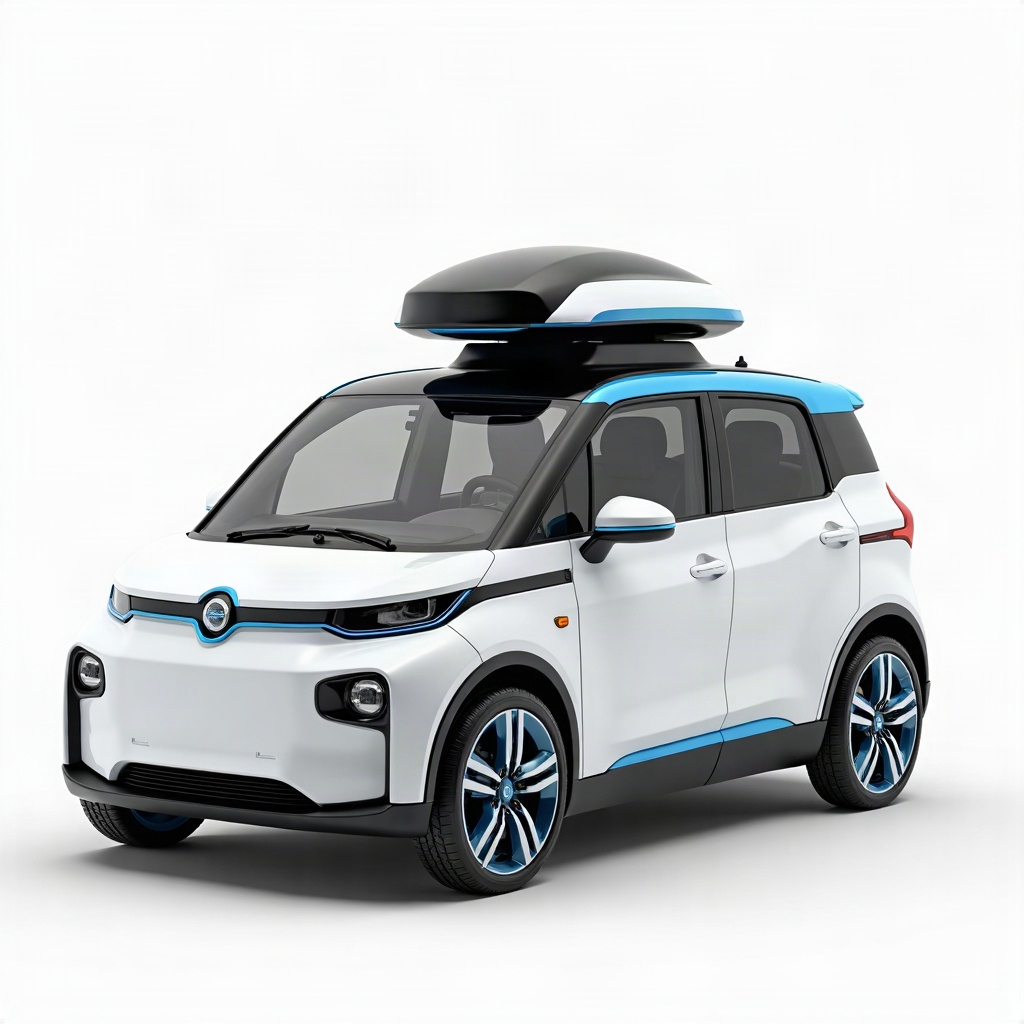
The civilization includes a Castle-trained Robotaxi and its elite upgrade, ranged Delivery Drones, and a Transamerica Pyramid wonder. Its bonuses affect workers, cavalry and universities, and it has two custom technologies.
The mod replaces the Burgundians' civilization slot when selected as a data mod. It does not add a new selectable civilization to the stock game's executable tables. That distinction is central to both installation and any remix. The example README on GitHub explains its contents. The mod was built against the September 2026 Steam build of the game.
A starting prompt for this idea
A civilization with a unique unit rendered from 3D is a big first project. This suggested adapted prompt scales it down to a smaller first version:
Use Universal Modder to investigate my Age of Empires II DE installation.
Read the San Franciscans example and plan a data mod with one original unit.
Identify the existing civilization slot to replace, the data files involved,
and the required camera, sprite headings and player-color layers.
Build a test scenario with one unit before adding technologies or bonuses.
You can select the code to copy it manually.
Use the prompt collection to record your version and test conditions. If this is your first game-modding project, the Terraria example has a smaller asset pipeline.
Route and tools used
This is a data mod plus graphics. The scripts read the user's installed game data with genieutils-py, prepare changed civilization and unit records, and build local mod files. AoE2ScenarioParser creates the demonstration scenario.
The unit-art route has four stages:
- Generate or supply a concept with clearly marked player-color areas.
- Turn the concept into a textured 3D model.
- Render the model from the game's camera at 16 headings, with animation and shadow passes.
- Pack the frames into AoE2's
.sldformat and connect them to the unit's data.
The wonder uses a single painted frame and skips the 3D stage. In the source, civ.py holds the civilization choices, make_sprites.py renders and packs units, and build_mod.py assembles the mod. The CLI reference explains where um render3d, asset generation and packaging checks fit into that workflow.
How to try it yourself
1. Match the source requirements
Use your own AoE2 DE Steam installation. The example requires Python 3.11 or later for its data tooling. Rendering the included models requires Blender 5.x, available on PATH or through the example's BLENDER setting. Installing requires the correct game profile directory.
The example supports Windows and WSL installation paths. Its Linux/Proton profile search is untested, so expect to confirm the profile location yourself on Linux. Start by installing Universal Modder and reading the source's current requirements.
2. Obtain the source and dependencies
From a repository clone, enter the example:
cd examples/aoe2-de-civYou can select the code to copy it manually.
Create and activate a project-specific Python environment with your preferred environment manager, then install the example's requirements there:
python -m pip install -r requirements.txtYou can select the code to copy it manually.
Confirm the intended game install and profile. If you have several profiles or Steam libraries, use the source's --game and --profile arguments rather than accepting an unrelated discovered directory. Back up the profile configuration before an install step changes it.
3. Prepare graphics and build without installing
Run the build sequence:
python make_sprites.py all robotaxi drone
python make_wonder.py
python build_mod.py
You can select the code to copy it manually.
Rendering performs thousands of small frames and needs Blender. Inspect the preview sheets before proceeding: scale, facing, shadows and player-color masks should make sense. The ordinary build_mod.py step writes the build directory; it does not install the mod until you add --install.
The source includes the initial concepts and models. Generating replacement concepts or models is a separate optional fal step with its own credentials and costs.
4. Install into the intended profile
After reviewing the output and confirming the profile:
python build_mod.py --installYou can select the code to copy it manually.
The script copies the local mod and updates that profile's mod-status file. For the optional demonstration map:
python make_scenario.py demo --installYou can select the code to copy it manually.
In the game, open Single Player → Skirmish, then select San Franciscans Civilization in the Data Mod dropdown. The civilization appears in the Burgundians' place. For the supplied map, choose the custom-scenario mode and sf_demo.
5. Verify the feature you intend to change
First check one unit beside stock units for size, facing and player color. Confirm its training condition and behavior in a real skirmish or a clearly controlled test scenario. Then check descriptions, technologies and other data changes.
To return to the stock civilization for a new game, stop selecting this data mod. If you remove its local files, close the game and use the source's profile-specific removal procedure, preserving unrelated mods and the profile backup.
Before sharing a build or remix, add installation instructions and credits and review the sharing FAQ. A clean packaging scan covers file checks only; confirm you have permission to distribute every derived data file.
What the agent learned
Plan around these constraints when building an AoE2 civilization:
- Data and selection UI can disagree. Additional civilization records can exist in data without appearing in the picker, so the example occupies an existing slot.
- A local data mod must be selected in the lobby. Placing it in the local-mod directory does not activate it for a skirmish.
- Menu art and command-panel icons use different paths. Menu artwork can be customized, while the in-game panel keeps stock icons from an atlas that the local mod route cannot extend.
- Scenario objects can miss normal progression triggers. A pre-placed Castle does not fire the technology event that the original training requirement expects.
- Edit structured data structurally. A broad text replacement can confuse a unit ID with a technology ID that happens to use the same number.
- The CLI defaults are not every animation setting. The example's rendering script uses the Python render API for some tuned motions; a simplified standalone command may produce visibly different Drone motion.
Inspecting the art and building the data covers only part of the work. Always check the mod in the lobby, through the training path and in actual gameplay.
Ideas to remix it
Replace the Robotaxi with one original utility vehicle.
Keep the existing data route and test its scale and 16 facings beside stock units.
You can select the code to copy it manually.
Change one civilization bonus, then create a controlled scenario that measures it.
Keep the original technology tree unchanged until that comparison is complete.
You can select the code to copy it manually.
Create a new wonder from my own original artwork.
Fit it to the documented footprint and check its scale next to existing buildings.
You can select the code to copy it manually.
Compare this data route with Minecraft inside GTA V, where two running games exchange state, or return to all examples. The project news page tracks changes to shared tools and documentation.