Fal Arsenal: a Terraria mod made with Universal Modder
Fal Arsenal adds five weapons, three enemies and a boss to Terraria through tModLoader. It shows how Universal Modder combines a loader API with generated sprites, and it ships with build instructions and design notes you can study before adapting it.
What this mod does
The arsenal combines ordinary item handling with custom projectile, world and camera behavior:
| Feature | What the example implements |
|---|---|
| Homing Missile Launcher | Guided missiles with splash damage and small craters |
| Tactical Nuke | A large explosion, terrain damage, a mushroom cloud and camera movement |
| Tesla Rifle | A lightning attack that can chain across nearby enemies |
| Singularity Launcher | A temporary black hole that pulls objects and enemies inward |
| Orbital Strike | A beam that targets an area and damages what it passes over |
| New enemies and boss | Scrap Drone, Neon Slime, Mech Walker and a two-phase Drone Mothership |
These effects can change the world, so use a spare world when trying the example. The example README on GitHub explains item recipes and behavior in more detail. The project targets Windows single-player on Terraria 1.4.4.9 through tModLoader 2026.07; multiplayer is untested.
A starting prompt for this idea
The Terraria missile-launcher-and-nuke idea makes a large first project. This adapted planning prompt scales it down to a single weapon:
Use Universal Modder to inspect my Terraria and tModLoader installation.
Read the Fal Arsenal source and field note, then plan one homing weapon.
Use a separate practice world, back up its saves and record the restore command.
Start with placeholder art and prove the weapon works before adding effects.
List any version differences from the upstream example before changing files.
You can select the code to copy it manually.
For a step-by-step first project, use the Universal Modder tutorial. The prompt collection has additional planning, asset and debugging prompts.
Route and tools used
The project uses tModLoader's C# API: item, projectile and NPC classes define the content, while system hooks handle effects that reach beyond one item. This is a loader-based route; the example does not need a replacement game engine.
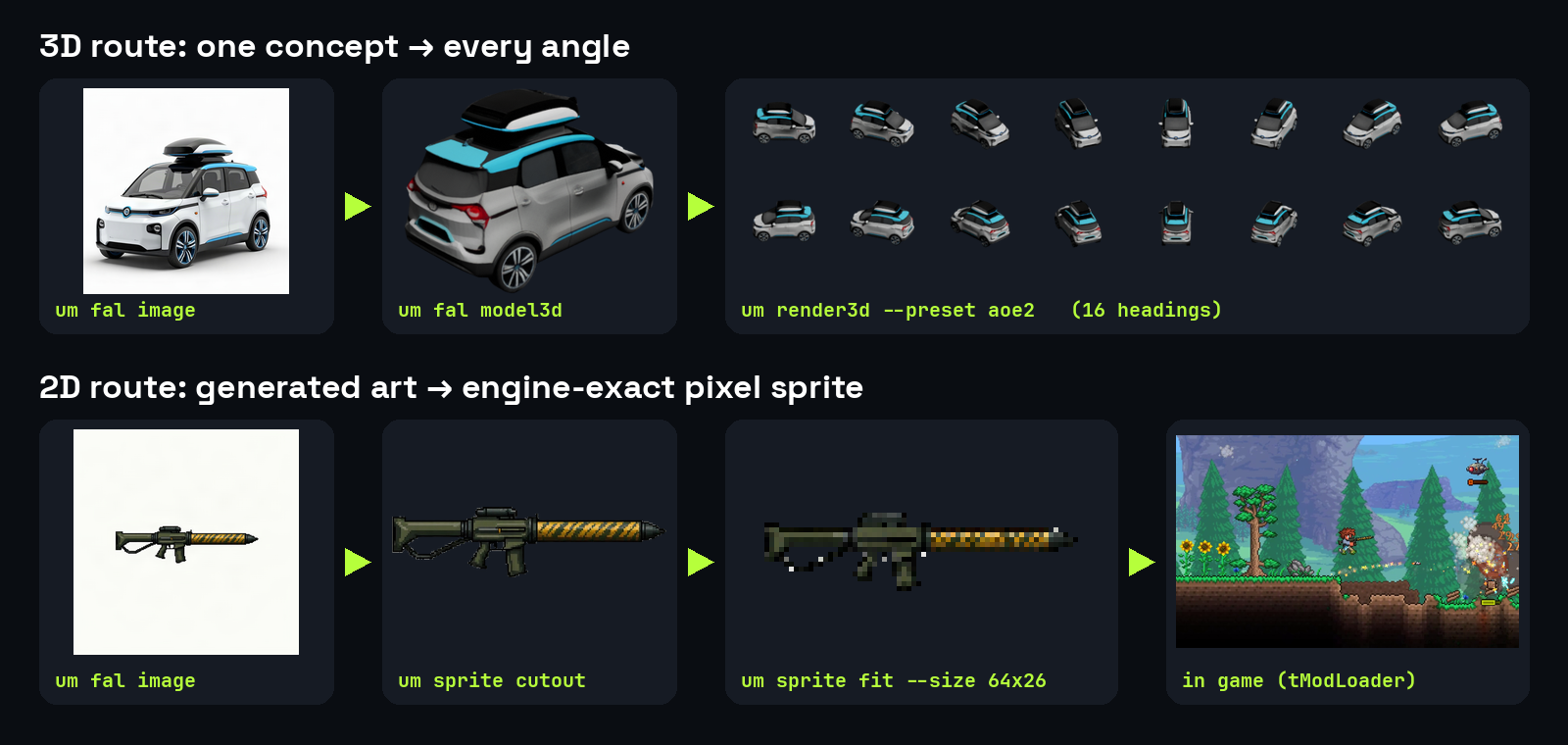
The source separates the work into weapon, enemy, boss, command and effect files. Artwork starts with fal-generated images, then passes through um sprite for transparency, orientation and frame sizing. See the um CLI reference for the distinction between generation, image processing, backup and packaging commands.
The existing generated art and scripts are included in the example. You only need a fal key to generate new art; inspecting the source or reusing the supplied example assets under their applicable terms does not require one.
How to try it yourself
1. Compare your environment
Own Terraria and add the free tModLoader app to your Steam library. tModLoader's startup checks require the app to be present there, even when you use a GitHub build. Record your actual game and loader versions and compare them with the example's documentation.
Complete the toolkit installation checks, then clone the source if you have not already obtained it:
git clone https://github.com/rehan-remade/universal-modderYou can select the code to copy it manually.
Open the example's README before copying files. Keep your source work separate from important saves and from unrelated mods.
2. Create a practice setup and a backup
Open tModLoader's Workshop → Develop Mods interface so it creates its ModSources folder and supporting targets file. Typical source locations are:
| Platform | Typical ModSources location |
|---|---|
| Windows | Documents\My Games\Terraria\tModLoader\ModSources\ |
| Linux | ~/.local/share/Terraria/tModLoader/ModSources/ |
| macOS | ~/Library/Application Support/Terraria/tModLoader/ModSources/ |
Confirm the actual folder used by your profile; an isolated -tmlsavedirectory changes the relevant save location. Close the game and snapshot that practice setup before loading the arsenal. The tutorial's backup step explains how to record both the backup name and the restore procedure.
3. Build the example
Copy only examples/terraria-tmodloader/FalArsenal/ into your chosen ModSources folder. In tModLoader, choose Workshop → Develop Mods → FalArsenal → Build + Reload.
You can also build from the command line. For example, from the tModLoader install folder with a suitable .NET runtime:
dotnet tModLoader.dll -build "PATH_TO_MODSOURCES/FalArsenal"You can select the code to copy it manually.
Replace the placeholder with the real source directory. On Windows, you can use the runtime bundled with tModLoader instead. Use the README's command for your environment rather than assuming every shell resolves dotnet in the same way.
Verification boundary: the ported example builds from the command line, but its in-game Build + Reload route has not been rerun since the port. If Build + Reload fails, try the command-line build before changing code.
4. Check a small feature in game
Load a spare world and obtain the weapons through the example's chat command:
/arsenalYou can select the code to copy it manually.
Check a single weapon first: its display name, sprite, orientation, firing behavior and related client.log entries. The /mothership command summons the boss, so save that for a later checkpoint. Explosive effects can permanently change the practice world; retain a clean snapshot if you want repeatable recordings.
5. Keep removal and packaging separate
Close the game and disable or remove only the experiment from the practice profile when finished. Preserve the source, logs and backup. For a world changed by the mod, use the pre-change snapshot with its original environment rather than using an important save to test removal.
Before sharing a remix, review its package and the project's sharing rules. Copying an example does not grant rights to distribute Terraria files or extracted assets.
What the agent learned
Keep these details in mind when adapting the code:
- Sprite direction belongs to the draw code. These item sprites point right, NPC sheets face left, and the projectile's rotation logic determines the expected starting direction.
- Animation sheets need a consistent frame layout. NPC frames are stacked vertically; the frame count and texture height must agree.
- Existing AI styles can have unwanted behavior. A vanilla fighter pattern stops pursuing the player in daylight, so the example's walker uses its own behavior.
- Recording is part of the engineering work. One in-game readback route caused large memory growth, so the project switched to external window capture.
- A repeatable scene needs a repeatable world. Terrain-damaging weapons change subsequent takes, so restore the clean world between them.
Terraria and tModLoader updates can change these behaviors; confirm the condition still exists in your version before applying a fix.
Ideas to remix it
Try one constrained change at a time:
Adapt the homing weapon into a training projectile with no terrain damage.
Add a clear hit indicator and verify it against one stationary test target.
You can select the code to copy it manually.
Give the Scrap Drone one new attack pattern while keeping its existing art.
Create a repeatable test scene and compare behavior before and after the change.
You can select the code to copy it manually.
Replace one item's placeholder with my original sprite.
Verify its dimensions, transparency, facing and in-game scale before changing code.
You can select the code to copy it manually.
For a different route, compare the AoE2 civilization example and the Minecraft/GTA passthrough. Follow project updates for changes that could affect the shared tools.