THE INDEPENDENT MODDING GUIDE
Universal Modder
Universal Modder is an open-source set of skills, tools and a knowledge base that lets AI coding agents mod almost any PC game you own.
★ 6.6K on GitHubMITUpdated
/plugin marketplace add rehan-remade/universal-modder
/plugin install universal-modder@universal-modder
You can select the code to copy it manually.
codex plugin marketplace add rehan-remade/universal-modder
codex plugin add universal-modder@universal-modder
You can select the code to copy it manually.
gemini extensions install https://github.com/rehan-remade/universal-modderYou can select the code to copy it manually.
Start with a game you own.
Build one small change.
Claude Code · Codex · Gemini CLI · VS Code / Copilot · Cursor · OpenCode
What is Universal Modder?
Universal Modder brings game-modding instructions, command-line tools and a shared knowledge base into your AI coding agent. You name a game you own and a change you want; the agent investigates the game, selects a modding route and works toward a result you can check in the game. How Universal Modder works in detail.
How to install Universal Modder
Choose the agent you already use. The project supports Claude Code, Codex, Gemini CLI, Cursor, VS Code with GitHub Copilot, and OpenCode. Each full integration connects the skills and optional fal asset service; the command-line tools support the work underneath.
Claude Code
Add the marketplace, then install the plugin.
/plugin marketplace add rehan-remade/universal-modder
/plugin install universal-modder@universal-modder
You can select the code to copy it manually.
Codex
Add the marketplace and plugin from your terminal.
codex plugin marketplace add rehan-remade/universal-modder
codex plugin add universal-modder@universal-modder
You can select the code to copy it manually.
Gemini CLI
Install the extension from the GitHub repository.
gemini extensions install https://github.com/rehan-remade/universal-modderYou can select the code to copy it manually.
VS Code / Copilot
Enable chat.plugins.enabled, run Chat: Install Plugin From Source, then enter this URL.
https://github.com/rehan-remade/universal-modderYou can select the code to copy it manually.
Cursor
Install from Cursor Marketplace, or open a clone in Cursor.
git clone https://github.com/rehan-remade/universal-modderYou can select the code to copy it manually.
OpenCode
Clone the repository and launch OpenCode inside it.
git clone https://github.com/rehan-remade/universal-modder
cd universal-modder
opencode
You can select the code to copy it manually.
Have Git and Python 3.10 or later ready. Video work needs ffmpeg, while rendering 3D models into sprites also needs Blender. The complete Universal Modder install guide explains dependencies, shell checks and the eight installation routes.
How Universal Modder works: the 10-step loop
- Search the knowledge base. Read previous notes for the game and engine, including the versions and unfinished work.
- Investigate the installation. Identify the edition, engine, loader and save locations before choosing a route.
- Prepare a practice environment. Back up saves and use an isolated profile or world where the game supports one.
- Read the relevant code and data. Work from the loader API and the installed game's actual behavior.
- Build one small feature. Get one item, unit or mechanic into the running game before expanding the idea.
- Make assets. Generate or supply art, sound or 3D models, then convert them to the game's required formats.
- Verify in the game. Check the logs and look at the result, including animation, scale and behavior.
- Record a demonstration. Capture a repeatable scene that shows what the feature does.
- Prepare the package. Check its contents, document installation and credit dependencies.
- Write a field note. Preserve versions, decisions and fixes so the next person can build on them.
The Universal Modder tutorial turns that loop into a small Terraria weapon project with planning prompts, backup commands and checkpoints.
What people have built with Universal Modder
The GitHub repository includes source projects for a Terraria arsenal, a new Age of Empires II civilization, and Minecraft running inside GTA V story mode. They show three different routes: a loader API, a data mod with rendered sprites, and a bridge between two running games.

Terraria: FalArsenal
Generated weapon art brought into a playable tModLoader example.
Source code on GitHub
Age of Empires II: San Franciscans
A custom civilization with original units, art and a documented build route.
Source code on GitHub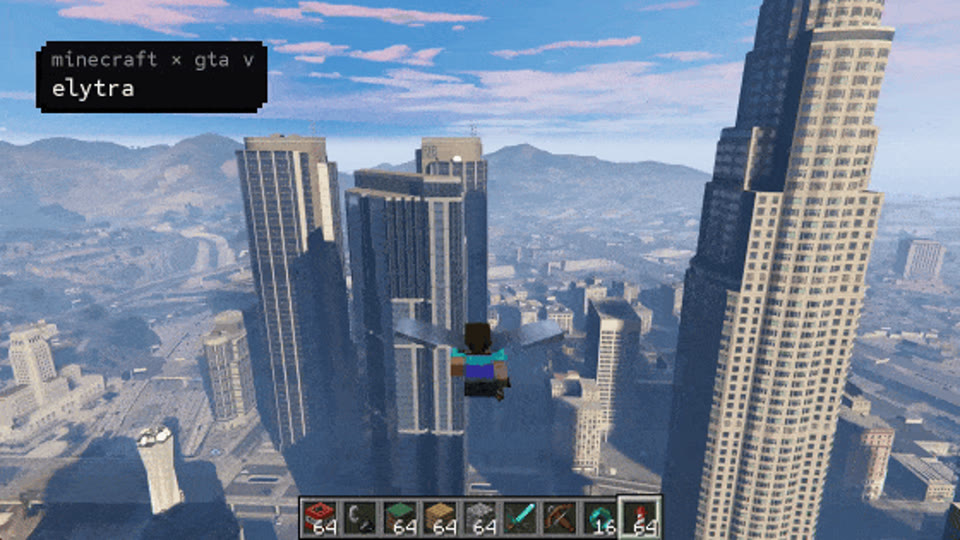
Minecraft inside GTA V
A cross-game experiment connecting Minecraft and GTA V story mode.
Source code on GitHubExplore the Universal Modder examples before choosing the scope of your first project. The small Terraria route is easier to reason about than a two-game rendering bridge.
Which games can it mod?
Universal Modder groups its engine guidance into 12 playbooks: Unity; Unreal; .NET/XNA; Godot; Source 1/2; Bethesda; Minecraft; AoE2/Genie; RE Engine, FromSoft, GTA, Cyberpunk and BG3 frameworks; native C++; smaller engines; and retro decompilation projects. Each playbook is an investigation route, so confirm your edition and loader before committing to it.
The knowledge base holds nearly 100 field notes. Each note records its author's environment and status; compare those details with your setup before reusing its steps. Start with the Universal Modder game guides, or open the knowledge index on GitHub.
What Universal Modder won't do
Universal Modder sets four practical boundaries:
- Work with games you own; do not inject into protected online clients, cheat against other players, or bypass anti-cheat, DRM or ownership checks.
- Distribute your own code and assets, patches or converters; do not ship game files, extracted assets or decompiled source.
- Back up saves before changing them and record the way back to the original setup.
- Ask before taking over input, adding loaders to game folders or publishing work, including a pull request.
Read the full safety rules on GitHub before your first session. The FAQ covers costs, platform limits and account safety.
Universal Modder FAQ
Is Universal Modder free?
The toolkit is MIT-licensed and free to install. Your agent provider and optional fal asset generation can have separate charges. See the FAQ for the cost breakdown.
Is Universal Modder safe?
The project includes backup, packaging and permission rules. Review the agent's tool access, work in a practice environment and check the result in the game.
Does it work on Mac?
The Python tools and supported agents can run on macOS, subject to their dependencies. Windows game automation needs Windows, either directly or driven from WSL.
Do I need a fal API key?
Only if you use the fal service for generated assets. You can start with placeholder art, your own assets, or an already configured local ComfyUI server.
Is this the official site?
No. This is an independent guide; Universal Modder is developed by rehan-remade at rehan-remade/universal-modder on GitHub.